


1
of
5
Loading...
Rhino | Product Model:
CO0008
Rhino 7 Business Edition
Regular price
¥174,900 JPY
Unit price
/
Unavailable
Subtotal
—
Rhino 7 Business Edition is backordered and will ship as soon as it is back in stock.
Choose add-on
Couldn't load pickup availability

Rhino 7 Business Edition
Regular price
¥174,900 JPY
Unit price
/
Unavailable
Rhino 7 Commercial Edition
Rhino 7 Commercial Edition provides designers with 3D surface software. Rhino can load raster designs and product photos as background images to draw curves, then use the surface tool to generate surfaces, and then combine multiple surfaces to form a solid object. Each individual surface can be freely changed in shape by adjusting control points, or the surface shape can be trimmed with the trim tool.
Product Features:
Production model, full functionality
The main 3D toolbars include working plane, setting view, display, selection, job window configuration, visibility, change, curve tools, surface tools, solid tools, mesh tools, rendering tools, and output tools. The tools provided by Rhino 7 can accurately create models for use as proposals, renderings, animations, engineering drawings, analysis and evaluation, and production.
• Shape Creation Through Geometry, Surfaces, Solids, and Meshes: The All-New SubD Tool <br> The all-new SubD tool creates organic shapes. For designers who need to quickly explore freeform surfaces, SubD is a new geometry type that allows for the creation and editing of extremely precise surfaces. Unlike other geometry definitions, SubD allows for rapid editing while retaining the precision of freeform design. SubD objects have high precision and can be directly converted into machinable solids and, if necessary, NURBS.

The extended QuadRemesh functionality can quickly reconstruct existing surfaces, solids, meshes, or SubDs into quad meshes, making it ideal for rendering, animation, CFD, FEA, and reverse engineering.
• Automation programming software: Grasshopper
Rhino 7 comes with Grasshopper, a built-in parametric modeling software. Grasshopper is a graphical programming software that enables the best collaboration between drawing and programming. It can provide real-time feedback on the drawing platform to the drawing output and the programming effect. It can save a lot of manpower and time for analysis or modeling, and can realize so-called automated thinking.

Quad Mesh <br> Quickly create quad meshes from existing surfaces, solids, meshes, or SubD, ideal for rendering, animation, CFD, FEA, and reverse engineering.

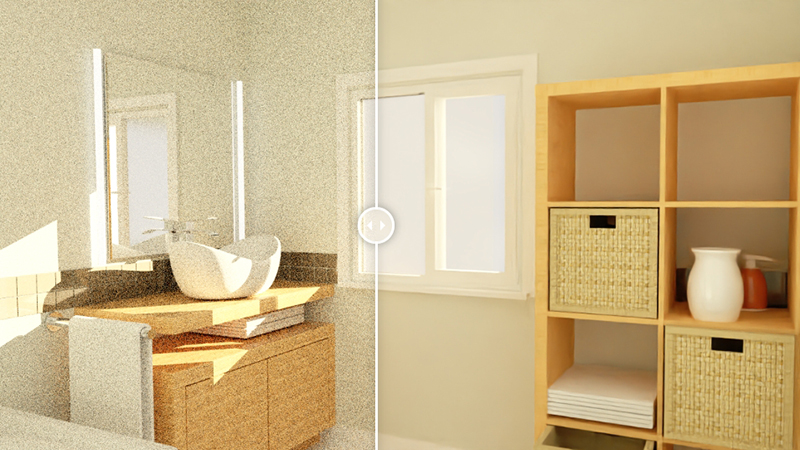
Realistic Color Effects <br> The powerful real-time color rendering tool Cycles can create realistic color renderings using the built-in material library and ambient lighting. Rhino 7 adds light attenuation, noise reduction, and gradient tools.
Various Deformation Controllers <br>Patented UDT Deformation Technology: Rhino's UDT tools can deform all Rhino objects: flow curves, flow surfaces, extensions, bending, twisting, rotation, spherical deformation, and deformation controllers.

Rhino 7 Commercial Edition provides designers with 3D surface software. Rhino can load raster designs and product photos as background images to draw curves, then use the surface tool to generate surfaces, and then combine multiple surfaces to form a solid object. Each individual surface can be freely changed in shape by adjusting control points, or the surface shape can be trimmed with the trim tool.
Product Features:
Production model, full functionality
The main 3D toolbars include working plane, setting view, display, selection, job window configuration, visibility, change, curve tools, surface tools, solid tools, mesh tools, rendering tools, and output tools. The tools provided by Rhino 7 can accurately create models for use as proposals, renderings, animations, engineering drawings, analysis and evaluation, and production.
• Shape Creation Through Geometry, Surfaces, Solids, and Meshes: The All-New SubD Tool <br> The all-new SubD tool creates organic shapes. For designers who need to quickly explore freeform surfaces, SubD is a new geometry type that allows for the creation and editing of extremely precise surfaces. Unlike other geometry definitions, SubD allows for rapid editing while retaining the precision of freeform design. SubD objects have high precision and can be directly converted into machinable solids and, if necessary, NURBS.
The extended QuadRemesh functionality can quickly reconstruct existing surfaces, solids, meshes, or SubDs into quad meshes, making it ideal for rendering, animation, CFD, FEA, and reverse engineering.
• Automation programming software: Grasshopper
Rhino 7 comes with Grasshopper, a built-in parametric modeling software. Grasshopper is a graphical programming software that enables the best collaboration between drawing and programming. It can provide real-time feedback on the drawing platform to the drawing output and the programming effect. It can save a lot of manpower and time for analysis or modeling, and can realize so-called automated thinking.
Quad Mesh <br> Quickly create quad meshes from existing surfaces, solids, meshes, or SubD, ideal for rendering, animation, CFD, FEA, and reverse engineering.
Realistic Color Effects <br> The powerful real-time color rendering tool Cycles can create realistic color renderings using the built-in material library and ambient lighting. Rhino 7 adds light attenuation, noise reduction, and gradient tools.
Various Deformation Controllers <br>Patented UDT Deformation Technology: Rhino's UDT tools can deform all Rhino objects: flow curves, flow surfaces, extensions, bending, twisting, rotation, spherical deformation, and deformation controllers.
| Software version | Rhino 7 Commercial Edition |
| File format | Acceptable file formats include: 3dm, rws, 3ds, ai, dwg, dxf, x, eps, srf; pex, gts, igs; iges, lwo, dgn, fbx, scn, obj, pdf, ply, raw, m, skp, slc, sldprt; sldasm, stp; step, stl, vda, wrl; vrml, gdf, zpr, asc; csv; txt; xyz; cgo_ascii; cgo_asci; pts. The exportable file formats are: 3dm, 3ds, sat, ai, dwg, dxf, dae, cd, x, emf, gf, pm, kmz, gts, igs;iges, lwo, udo, fbx, obj, csv, x_t, pdf, ply, pov, raw, rib, skp, slc, stp; step, stl, vda, wrl; vrml, gdf, wmf, x3dv, xaml, xgl, zpr, txt. |
| language | English, Spanish, German, French, Italian, Czech, Polish, Japanese, Korean Simplified Chinese and Traditional Chinese versions. |
| Authorization Management | Standalone startup Zoo Zone Network Authorization Cloud Zoo cloud-based authorization. |
| Windows system (basic requirements) | Intel 64-bit or AMD (non-ARM) processors 8 GB or more of RAM is recommended. 600 MB of disk space is required. A graphics card compatible with OpenGL 4.1 is recommended, along with 6 GB of dedicated video memory. It is recommended to use a mouse with multiple buttons and a scroll wheel. SpaceNavigator (optional) Apple hardware supports running Windows with Bootcamp. (Apple Silicon M1 Macs do not support Boot Camp) For Windows operating systems, it is recommended to use Windows 11, 10, or 8.1. Windows VDI (Virtual Desktop Infrastructure) |
| Windows system (recommended requirement) | Intel 64-bit or AMD (non-ARM) processors 16 GB or more of RAM is recommended. 5GB of disk space is recommended; an OpenGL 4.1 compatible graphics card is recommended; 6GB of dedicated video memory is recommended. It is recommended to use a mouse with multiple buttons and a scroll wheel. SpaceNavigator (optional) Apple hardware supports running Windows with Bootcamp. (Apple Silicon M1 Macs do not support Boot Camp) For Windows operating systems, Windows 11 or 10 are recommended. |
| Windows basic hardware requirements | Intel® Core™ i5 processor AMD Ryzen™ 5 processor 8 GB of memory (16 GB or more recommended) For a 256 GB SSD or larger, it is recommended to use an Nvidia Quadro or GeForce or at least 4 GB of dedicated graphics memory. Quadro drawing cards (P1000 and above) GeForce graphics cards (GTX1650 and above) operating system: It is recommended to use Windows 11 or 10. |
| Windows recommended hardware specifications requirements | Intel® Core™ i7 or i9 processor AMD Ryzen™ 7 or 9 processor 32GB or more of memory For SSDs of 500 GB or more and HDDs of 1 TB or more, it is recommended to use Nvidia Quadro or GeForce / 6 GB or more of dedicated graphics memory. Quadro drawing cards (P2200 or RTX4000 and above) GeForce graphics card (RTX 1660 or RTX 3060 or higher) operating system: It is recommended to use Windows 11 or 10. |
| Mac system (basic requirements) | Intel Mac or Apple Silicon Mac 8 GB or more of RAM is recommended. Intel Macs recommend using AMD graphics processors. With 5 GB of disk space, it is recommended to use a multi-button mouse with a scroll wheel. SpaceNavigator and SpaceMouse Wireless (optional) macOS operating system: macOS 12.0.1 (Monterey) macOS 11.3 (Big Sur) macOS 10.15.7 (Catalina) macOS 10.14.6 (Mojave) |
| Mac system (recommended requirement) | iMac, iMac Pro, Mac Pro, MacBook Pro 16GB or more of RAM is recommended. Intel Macs recommend using AMD graphics processors. With 20GB of disk space, it is recommended to use a mouse with multiple buttons and a scroll wheel. SpaceNavigator and SpaceMouse Wireless (optional) macOS operating system: macOS 12.0.1 (Monterey) macOS 11.3 (Big Sur) macOS 10.15.7 (Catalina) macOS 10.14.6 (Mojave) |
| Mac basic hardware requirements | Apple Mac (13-inch MacBook Pro) Intel Core i5 or Apple M1 16 GB of memory. 256 GB SSD Intel Iris Plus Graphics macOS operating system: macOS 12.0.1 (Monterey) macOS 11.3 (Big Sur) macOS 10.15.7 (Catalina) macOS 10.14.6 (Mojave |
| Mac recommended hardware specifications requirements | iMac, iMac Pro, Mac Pro, MacBook Pro Apple M1 or Intel Core i7 or above 16 GB of memory (32 GB or more recommended) 512 GB SSD or above Radeon Pro 5300 4GB or higher Radeon Pro 5300 4GB Radeon Pro 5300M 4GB Radeon Pro 5500 XT 8GB Radeon Pro 5700 8GB Radeon Pro 5700 XT 16GB Radeon Pro Vega 20 4GB Radeon Pro Vega 48 8GB Radeon Pro Vega 56 8GB Radeon Pro Vega 64 16GB |