


1
of
5
Loading...
Snapmaker | Product Model:
SK0101
Snapmaker 2.0 Dual-Head 3D Printing Module
Regular price
¥75,000 JPY
Unit price
/
Unavailable
Subtotal
—
Snapmaker 2.0 Dual-Head 3D Printing Module is backordered and will ship as soon as it is back in stock.
Choose add-on
Couldn't load pickup availability

Snapmaker 2.0 Dual-Head 3D Printing Module
Regular price
¥75,000 JPY
Unit price
/
Unavailable
Snapmaker 2.0 Dual-Head 3D Printing Module
Compatible models: Snapmaker 2.0 A350T/A350/F350
• Snapmaker 2.0 A250T/A250/F250
• Snapmaker 2.0 A150
* Includes the hot end of two 0.4 mm brass nozzles.
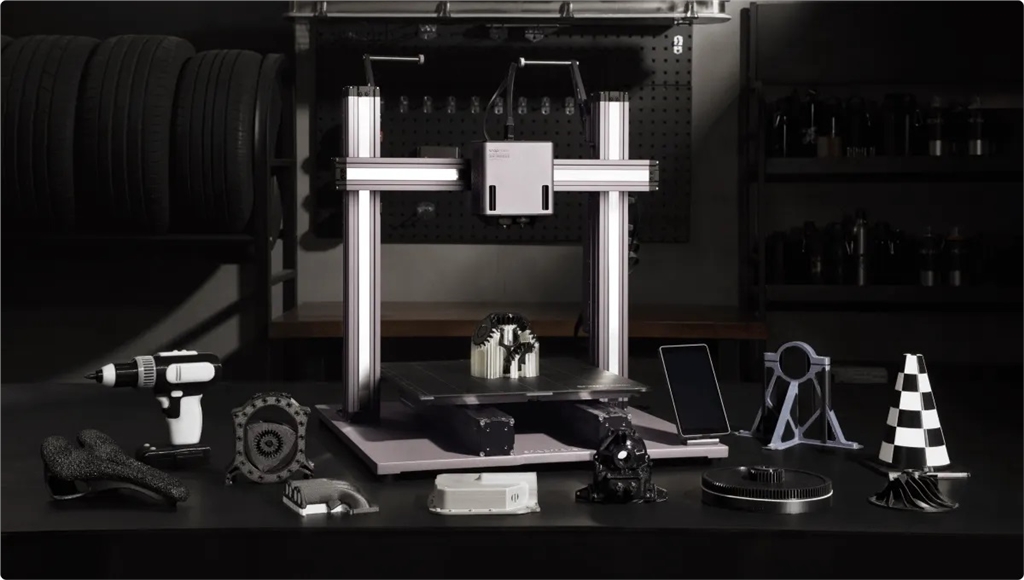
Dual nozzles working in tandem, with over 10 material combinations.
PVA
Breakaway PLA
Stable extrusion, 20mm³/s flow rate, high-quality printing.
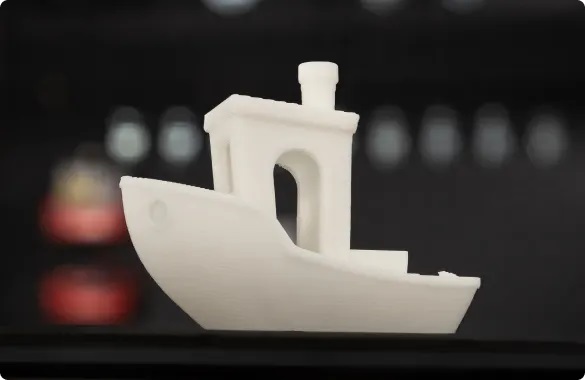
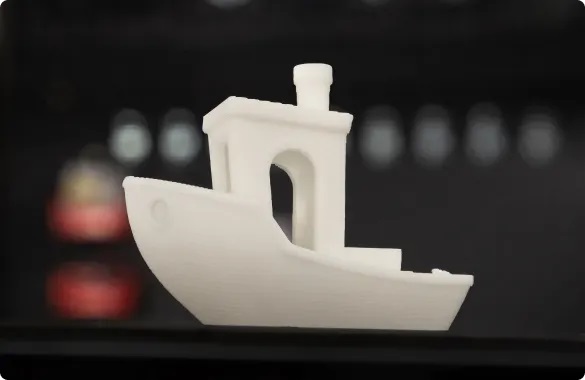
Single-nozzle extrusion Dual-nozzle extrusion
Dual-head collaboration, switching in 3 seconds
Given how time-consuming printhead switching is on other dual-extrusion printers, you might have another question: how do two hot ends operate on a single module? Initially, we considered raising the module to a certain height and having it strike a lever on the Z-axis to switch printheads, but we were also quite alarmed by the loud noise generated during printhead switching. So we came up with a more efficient and elegant method: using a motor for switching. When your G-code tells the device "time to switch heads," the high-precision linear guide in the module automatically lifts the hot end, thus switching the hot end and continuing printing. The entire process is completed within 3 seconds, with a switching repeatability accuracy of 0.012mm.
Use a nozzle for detailed work, and a large nozzle for filling.
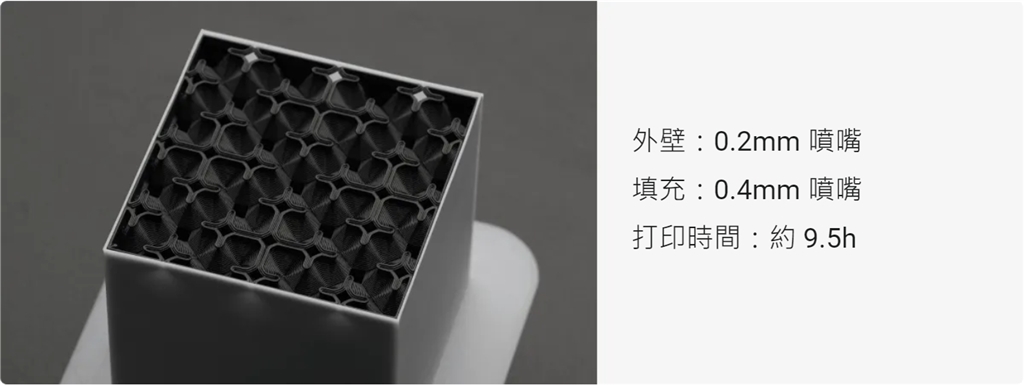
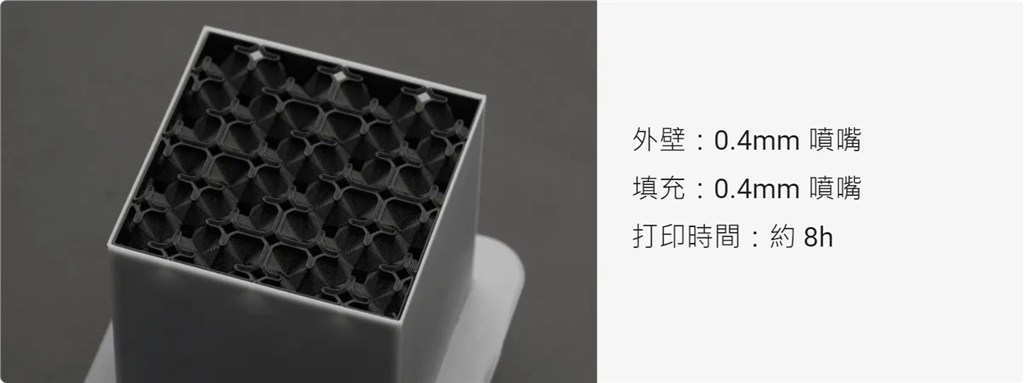
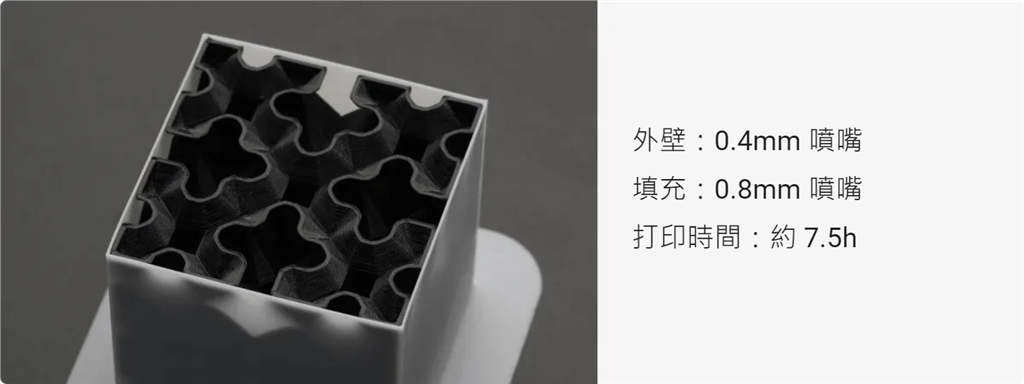
This convenient and fun 3D printing technology is so appealing, don't you want to print your own creations? Contact us to learn more about Snapmaker and 3D printing technology!
Compatible models: Snapmaker 2.0 A350T/A350/F350
• Snapmaker 2.0 A250T/A250/F250
• Snapmaker 2.0 A150
* Includes the hot end of two 0.4 mm brass nozzles.
Dual nozzles working in tandem, with over 10 material combinations.
Dual printheads are a skill that can be learned, and once you master them, you'll find yourself hooked. Because for 3D printing, single printheads ultimately have limitations, such as for finished products with complex structures and intricate details, objects combining PLA and TPU materials, or a two-color toy your child has been longing for.
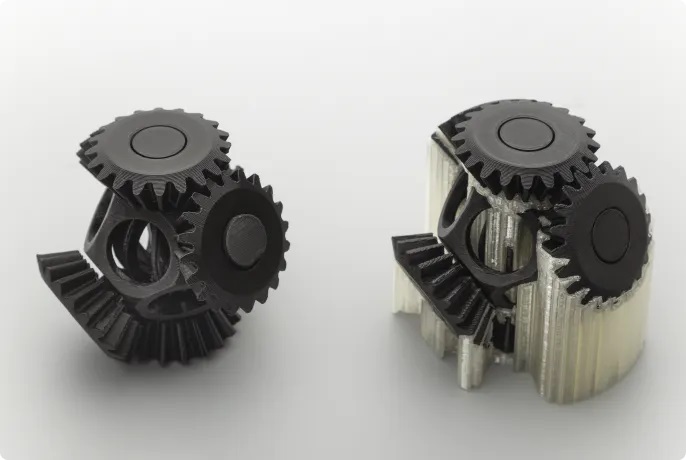
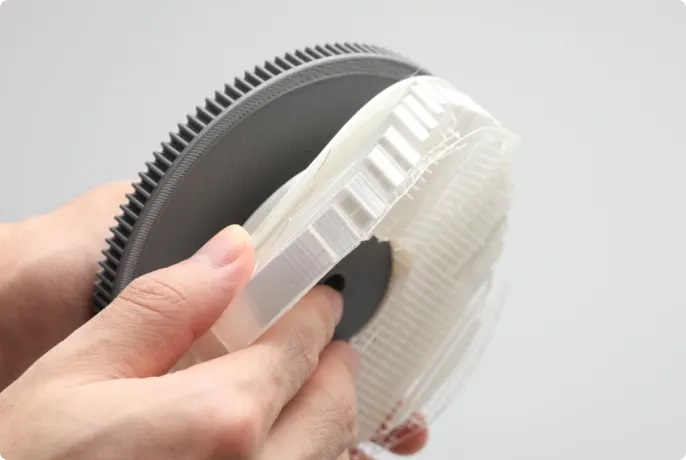
We know that removing model supports is not easy; it's time-consuming and often doesn't yield satisfactory results. But 3D printing doesn't require such trouble. You simply need to hang a roll of water-soluble PVA filament on the other side of the PLA filament, and the printed model will float to the surface cleanly and without damage.
PVA
Breakaway PLA
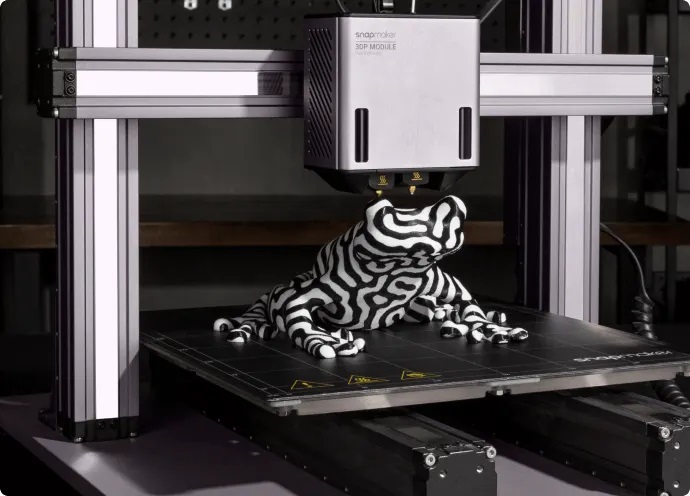
Multicolor printing
People often say less is more because to highlight core qualities, the fewer extraneous elements, the better. But when it comes to color, who would choose monotony? A monochrome zebra is just a toy, but if you print it with black and glossy white ink, you will give it life, depth, and meaning.
People often say less is more because to highlight core qualities, the fewer extraneous elements, the better. But when it comes to color, who would choose monotony? A monochrome zebra is just a toy, but if you print it with black and glossy white ink, you will give it life, depth, and meaning.
Quick heat exchanger
Furthermore, thanks to the hot end, which can be changed in 5 seconds, you can also use engineered materials such as glass fiber nylon and carbon fiber nylon. Luban will automatically recognize the hot end and provide you with the appropriate printing settings.
Furthermore, thanks to the hot end, which can be changed in 5 seconds, you can also use engineered materials such as glass fiber nylon and carbon fiber nylon. Luban will automatically recognize the hot end and provide you with the appropriate printing settings.
Stable extrusion, 20mm³/s flow rate, high-quality printing.
You might be wondering, what about the print quality? Let's do the math: Stepper motor + planetary reducer + dual extrusion wheels on each hot end = ?
Each side of the module has a planetary reducer with a transmission ratio of 7.5:1, which amplifies the torque applied by the motor, allowing the module to be equipped with a relatively small motor to achieve the necessary extrusion force. Removing unnecessary weight also makes the module wobble less under the same acceleration, thus ensuring that each nozzle has the same printing accuracy.
Each side of the module has a planetary reducer with a transmission ratio of 7.5:1, which amplifies the torque applied by the motor, allowing the module to be equipped with a relatively small motor to achieve the necessary extrusion force. Removing unnecessary weight also makes the module wobble less under the same acceleration, thus ensuring that each nozzle has the same printing accuracy.
Meanwhile, the dual extrusion rollers, with 68 teeth and a diameter of 12mm, can fully contact the filament they extrude, thus applying a stable force to the filament and preventing over-extrusion or under-extrusion due to uneven force. Therefore, returning to the earlier question, the answer is sufficient and stable extrusion, an extrusion flow rate of 20mm³/s, and high-quality printing results.
Single-nozzle extrusion Dual-nozzle extrusion
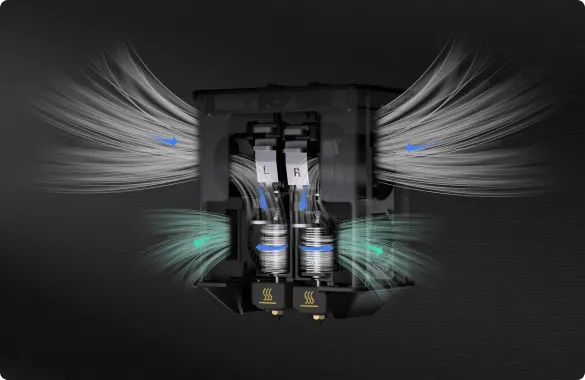
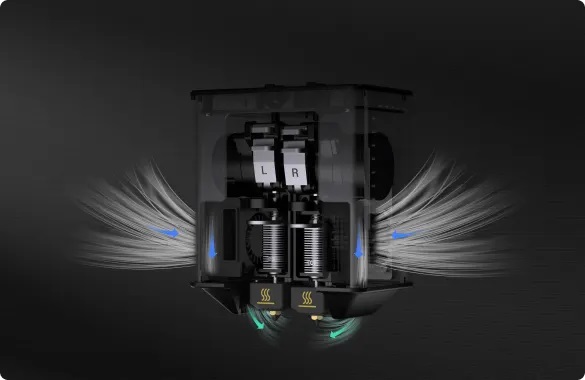
Four fans maintain a constant temperature
Besides removing the supports, another headache is cleaning the printheads clogged with consumables. With the Snapmaker dual-head 3D printing module, you shouldn't have to worry about this for a long time.
Each hot end has its own fan, and the blower directs air onto the throat to prevent overheating and premature melting of the filament, which could clog the nozzles. Furthermore, if you're still reeling from a disastrous experience with a suspended structure, you can rest assured now, as the nozzles and model also have their own fans located at both ends of the lower part of the module. Whether it's a challenging suspended structure or ABS/nylon filament, you can print with confidence and adjust the fan speed as needed during the process.
Dual-head collaboration, switching in 3 seconds
Given how time-consuming printhead switching is on other dual-extrusion printers, you might have another question: how do two hot ends operate on a single module? Initially, we considered raising the module to a certain height and having it strike a lever on the Z-axis to switch printheads, but we were also quite alarmed by the loud noise generated during printhead switching. So we came up with a more efficient and elegant method: using a motor for switching. When your G-code tells the device "time to switch heads," the high-precision linear guide in the module automatically lifts the hot end, thus switching the hot end and continuing printing. The entire process is completed within 3 seconds, with a switching repeatability accuracy of 0.012mm.
Use a nozzle for detailed work, and a large nozzle for filling.
For added flexibility, you can adjust the nozzle settings in Luban. When printing models requiring high aesthetic appeal, use the hot end of a 0.2mm nozzle to print the outer walls, resulting in both a beautiful and robust finish. When printing models with more infill structures, using the hot end of a 0.6 or 0.8mm nozzle will be more efficient.
Fully automatic leveling
If your leveling card is lost, don't worry about it. The proximity switches inside the module will detect the fixed points on the heated bed one by one, and the main controller will process this data. The last point will no longer require manual leveling. Z-axis calibration is also easy; the photoelectric switches will handle it for you.
Power outage and material shortage resume printing
Like the single-head module, the dual-head 3D printing module also supports resume printing after power failure and material interruption. Simply follow the on-screen instructions to resume printing.
Like the single-head module, the dual-head 3D printing module also supports resume printing after power failure and material interruption. Simply follow the on-screen instructions to resume printing.
Remark
[1] You can purchase hot ends with nozzle diameters of 0.2, 0.6, and 0.8 mm, as well as hardened steel hot ends with a diameter of 0.4 mm, from the Snapmaker official store. They are compatible with Snapmaker 2.0 and Artisan's dual-nozzle 3D printing modules.
[2] Without the Snapmaker 2.0 housing, the fan noise at full speed is 55.6 dB; while with the Snapmaker 2.0 housing, the fan noise at full speed is 42.3 dB.
[3] Hardened steel nozzles should be used when using Indonesian nylon and reinforced nylon consumables.
[1] You can purchase hot ends with nozzle diameters of 0.2, 0.6, and 0.8 mm, as well as hardened steel hot ends with a diameter of 0.4 mm, from the Snapmaker official store. They are compatible with Snapmaker 2.0 and Artisan's dual-nozzle 3D printing modules.
[2] Without the Snapmaker 2.0 housing, the fan noise at full speed is 55.6 dB; while with the Snapmaker 2.0 housing, the fan noise at full speed is 42.3 dB.
[3] Hardened steel nozzles should be used when using Indonesian nylon and reinforced nylon consumables.
This convenient and fun 3D printing technology is so appealing, don't you want to print your own creations? Contact us to learn more about Snapmaker and 3D printing technology!
| Dimensions (width × depth × height) | 108 mm × 70 mm × 133 mm |
| Packaging dimensions (width × depth × height) | 279 mm × 254 mm × 177 mm |
| Frame material | aluminum alloy |
| net weight | 1 kg |
| Package weight | 3.2 kg |
| A150 build volume (W × D × H) |
135 mm × 140 mm × 110 mm (Dual/Right Nozzle) 145 mm × 145 mm × 110 mm (left nozzle) |
| A250/A250T/F250 Molding Volume (W × D × H) |
220 mm × 235 mm × 210 mm |
| A350/A350T/F350 build volume (W × D × H) |
310 mm × 325 mm × 290 mm (dual nozzle) 310 mm × 330 mm × 290 mm (left/right nozzle) |
| flow | 20 mm³/s |
| Nozzle diameter (standard) | 0.4 mm |
| Nozzle diameter (sold separately) | 0.2 mm, 0.6 mm, 0.8 mm |
| Nozzle material (standard) | brass |
| Nozzle material (sold separately) | Hardened steel |
| Nozzle maximum temperature | 300℃ |
| Recommended maximum print speed | 100 mm/s |
| Supporting materials | PLA, ABS, ASA, PETG, TPU, separated PLA, PVA, HIPS, nylon, carbon fiber reinforced nylon, glass fiber reinforced nylon |
| Provide software | Snapmaker Luban (supports third-party software) |
| Input voltage | 24V DC |
| Operating temperature | 15°C–30°C |
| Supported file formats | stl, obj |