


Loading...
Rhino | Product Model:
CO0009
Rhino 8 Business Upgrade
Subtotal
—
Rhino 8 Business Upgrade is backordered and will ship as soon as it is back in stock.
Choose add-on
Couldn't load pickup availability

Rhino 8 Business Upgrade
Rhino 8 Business Upgrade
Rhino 8 brings new modeling tools such as ShrinkWrap, providing Mac users with powerful speed improvements, SubD sharpening, push-pull workflows, better drawing tools, a more customizable user interface, a faster rendering engine, new Grasshopper data types, and much more.
New features in Rhino 8 :
ShrinkWrap: Turning Waste into Gold
ShrinkWrap can create tightly wrapped meshes around open or closed meshes, NURBS geometry objects, SubD and point clouds: ideal for creating meshes for 3D printing.
ShrinkWrap is perfect for building:
• Grids for 3D printing
• Enclose multiple objects into a single solid mesh.
• Merge 3D scan data gaps into a single solid mesh
• Mesh without internal self-intersection
• Offset grid for thin shells
• Mesh from point cloud during reverse engineering
• Enclose damaged or irreparable geometric objects into a mesh.
Designed specifically for Mac
Rhino for Mac is faster than ever before, runs natively on Apple Silicon and Intel Macs, and uses Apple Metal display technology. The Mac's user interface is also closer to Windows.

SubD Sharp Edge
SubD Sharp Edges can create a gradient rounded corner between smooth and sharp edges without increasing the complexity of the SubD mesh.

Modeling: More simplified
Rhino 8 unlocks new modeling workflows (such as PushPull) and adds more intuitive new features for manipulation axes, automatic work planes, and more.

Cut-off and cross-section
Rhino 8 includes many enhancements to truncation and sectioning features to help support various drafting and manufacturing workflows.

proposal
In Rhino 8, we updated the Cycles rendering engine, making the UV workflow smoother, improving procedural mapping, adding display modes, and more.

Grasshopper: Rhino data type
Rhino data types allow you to bake geometric objects with custom properties, import more file formats, control blocks, use local materials in the display pipeline, create section lines and annotations, and many other extended workflows.

Rhino's meticulous craftsmanship
We fixed hundreds of bugs, added new linetypes, improved mesh Boolean operations, enhanced surface editing tools, and more.

Development Platform
Rhino 8 brings a new code editor, support for CPython and .NET 7, significant improvements to the free SDKs, refined API enhancements, and several major new features that expand and deepen the foundation of the geometry development platform.

Other information
Looking for a complete list of new commands? If you don't find what you need and the command options above, check out the new features in Rhino 8 .

Rhino 8 brings new modeling tools such as ShrinkWrap, providing Mac users with powerful speed improvements, SubD sharpening, push-pull workflows, better drawing tools, a more customizable user interface, a faster rendering engine, new Grasshopper data types, and much more.
New features in Rhino 8 :
ShrinkWrap: Turning Waste into Gold
ShrinkWrap can create tightly wrapped meshes around open or closed meshes, NURBS geometry objects, SubD and point clouds: ideal for creating meshes for 3D printing.
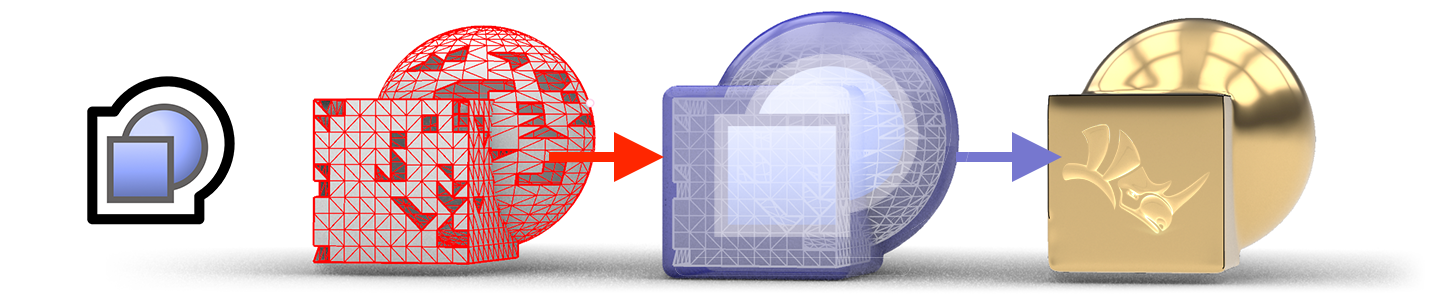
ShrinkWrap is perfect for building:
• Grids for 3D printing
• Enclose multiple objects into a single solid mesh.
• Merge 3D scan data gaps into a single solid mesh
• Mesh without internal self-intersection
• Offset grid for thin shells
• Mesh from point cloud during reverse engineering
• Enclose damaged or irreparable geometric objects into a mesh.
Designed specifically for Mac
Rhino for Mac is faster than ever before, runs natively on Apple Silicon and Intel Macs, and uses Apple Metal display technology. The Mac's user interface is also closer to Windows.
SubD Sharp Edge
SubD Sharp Edges can create a gradient rounded corner between smooth and sharp edges without increasing the complexity of the SubD mesh.
Modeling: More simplified
Rhino 8 unlocks new modeling workflows (such as PushPull) and adds more intuitive new features for manipulation axes, automatic work planes, and more.
Cut-off and cross-section
Rhino 8 includes many enhancements to truncation and sectioning features to help support various drafting and manufacturing workflows.
proposal
In Rhino 8, we updated the Cycles rendering engine, making the UV workflow smoother, improving procedural mapping, adding display modes, and more.
Grasshopper: Rhino data type
Rhino data types allow you to bake geometric objects with custom properties, import more file formats, control blocks, use local materials in the display pipeline, create section lines and annotations, and many other extended workflows.
Rhino's meticulous craftsmanship
We fixed hundreds of bugs, added new linetypes, improved mesh Boolean operations, enhanced surface editing tools, and more.
Development Platform
Rhino 8 brings a new code editor, support for CPython and .NET 7, significant improvements to the free SDKs, refined API enhancements, and several major new features that expand and deepen the foundation of the geometry development platform.
Other information
Looking for a complete list of new commands? If you don't find what you need and the command options above, check out the new features in Rhino 8 .
| Software version | Rhino 8 Commercial Edition |
| File format | Acceptable file formats include: 3dm, rws, 3ds, ai, dwg, dxf, x, eps, srf; pex, gts, igs; iges, lwo, dgn, fbx, scn, obj, pdf, ply, raw, m, skp, slc, sldprt; sldasm, stp; step, stl, vda, wrl; vrml, gdf, zpr, asc; csv; txt; xyz; cgo_ascii; cgo_asci; pts. The exportable file formats are: 3dm, 3ds, sat, ai, dwg, dxf, dae, cd, x, emf, gf, pm, kmz, gts, igs;iges, lwo, udo, fbx, obj, csv, x_t, pdf, ply, pov, raw, rib, skp, slc, stp; step, stl, vda, wrl; vrml, gdf, wmf, x3dv, xaml, xgl, zpr, txt. |
| language | English, Spanish, German, French, Italian, Czech, Polish, Japanese, Korean Simplified Chinese and Traditional Chinese versions. |
| Authorization Management | Standalone startup Zoo Zone Network Authorization Cloud Zoo cloud-based authorization. |
| Windows system (basic requirements) | Intel 64-bit or AMD (non-ARM) processors 8 GB or more of RAM is recommended. 600 MB of disk space is required. A graphics card compatible with OpenGL 4.1 is recommended, along with 6 GB of dedicated video memory. It is recommended to use a mouse with multiple buttons and a scroll wheel. SpaceNavigator (optional) Apple hardware supports running Windows with Bootcamp. (Apple Silicon M1 Macs do not support Boot Camp) For Windows operating systems, it is recommended to use Windows 11, 10, or 8.1. Windows VDI (Virtual Desktop Infrastructure) |
| Windows system (recommended requirement) | Intel 64-bit or AMD (non-ARM) processors 16 GB or more of RAM is recommended. 5GB of disk space is recommended; an OpenGL 4.1 compatible graphics card is recommended; 6GB of dedicated video memory is recommended. It is recommended to use a mouse with multiple buttons and a scroll wheel. SpaceNavigator (optional) Apple hardware supports running Windows with Bootcamp. (Apple Silicon M1 Macs do not support Boot Camp) For Windows operating systems, Windows 11 or 10 are recommended. |
| Windows basic hardware requirements | Intel® Core™ i5 processor AMD Ryzen™ 5 processor 8 GB of memory (16 GB or more recommended) For a 256 GB SSD or larger, it is recommended to use an Nvidia Quadro or GeForce or at least 4 GB of dedicated graphics memory. Quadro drawing cards (P1000 and above) GeForce graphics cards (GTX1650 and above) operating system: It is recommended to use Windows 11 or 10. |
| Windows recommended hardware specifications requirements | Intel® Core™ i7 or i9 processor AMD Ryzen™ 7 or 9 processor 32GB or more of memory For SSDs of 500 GB or more and HDDs of 1 TB or more, it is recommended to use Nvidia Quadro or GeForce / 6 GB or more of dedicated graphics memory. Quadro drawing cards (P2200 or RTX4000 and above) GeForce graphics card (RTX 1660 or RTX 3060 or higher) operating system: It is recommended to use Windows 11 or 10. |
| Mac system (basic requirements) | Intel Mac or Apple Silicon Mac 8 GB or more of RAM is recommended. Intel Macs recommend using AMD graphics processors. With 5 GB of disk space, it is recommended to use a multi-button mouse with a scroll wheel. SpaceNavigator and SpaceMouse Wireless (optional) macOS operating system: macOS 12.0.1 (Monterey) macOS 11.3 (Big Sur) macOS 10.15.7 (Catalina) macOS 10.14.6 (Mojave) |
| Mac system (recommended requirement) | iMac, iMac Pro, Mac Pro, MacBook Pro 16GB or more of RAM is recommended. Intel Macs recommend using AMD graphics processors. With 20GB of disk space, it is recommended to use a mouse with multiple buttons and a scroll wheel. SpaceNavigator and SpaceMouse Wireless (optional) macOS operating system: macOS 12.0.1 (Monterey) macOS 11.3 (Big Sur) macOS 10.15.7 (Catalina) macOS 10.14.6 (Mojave) |
| Mac basic hardware requirements | Apple Mac (13-inch MacBook Pro) Intel Core i5 or Apple M1 16 GB of memory. 256 GB SSD Intel Iris Plus Graphics macOS operating system: macOS 12.0.1 (Monterey) macOS 11.3 (Big Sur) macOS 10.15.7 (Catalina) macOS 10.14.6 (Mojave |
| Mac recommended hardware specifications requirements | iMac, iMac Pro, Mac Pro, MacBook Pro Apple M1 or Intel Core i7 or above 16 GB of memory (32 GB or more recommended) 512 GB SSD or above Radeon Pro 5300 4GB or higher Radeon Pro 5300 4GB Radeon Pro 5300M 4GB Radeon Pro 5500 XT 8GB Radeon Pro 5700 8GB Radeon Pro 5700 XT 16GB Radeon Pro Vega 20 4GB Radeon Pro Vega 48 8GB Radeon Pro Vega 56 8GB Radeon Pro Vega 64 16GB |